> For the complete documentation index, see [llms.txt](https://oliver-3.gitbook.io/redteam-notes/llms.txt). Markdown versions of documentation pages are available by appending `.md` to page URLs; this page is available as [Markdown](https://oliver-3.gitbook.io/redteam-notes/dockerlabs/mirame.md).
# mirame
Iniciando con un escaneo de puertos, obtengo informacion de que el puerto 22 y el 80 estan abiertos\
Una vez dentro no hay mucho por hacer ni ver, asi que ejecute un sqlmap, trayendo como resultado la tabla de usuarios con sus contraseñas.
En primer instancia considere que algún par de datos seria el acceso al ssh de puerto 22 pero no funciono.
Con fuzz de directorios tampoco conseguí nada relavante.\
Un dato raro que me llamo la atencion fue la existencia de un usuario "directorio" con esa contraseña.
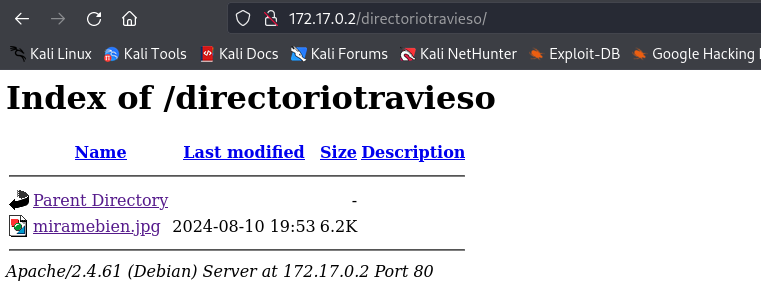
Asique probe de insertar ambos en la url de la maquina y abrirlo en el buscador, obteniendo la siguiente imagen.
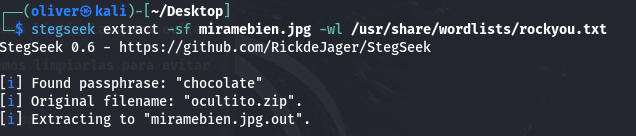
La descargue y aplique esteganografia para analizar la imagenComment.
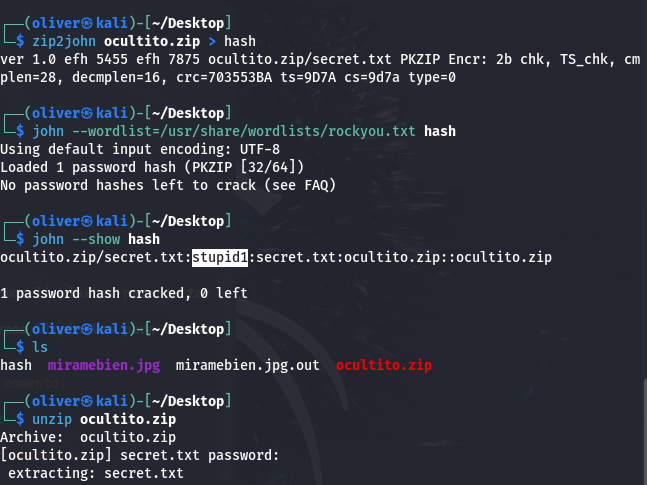
Conseguimos un archivo .zip, al no contrar con la pass del archivo decidi probar con zip2john.
* Utilizo zip2john para extraer el hash y luego crackearlo usando la herramienta john the ripperComment.
* Una vez obtenida la contraseña del archivo zip, al descomprimir nos entrega un archivo txt una credencial, la cual esta vez, si es del ssh.

Ya dentro de la maquina, siendo el usuario "carlos", veo si hay algún binario que podamos aprovechar en el SUID.CommentBuscando en GTFOBins la herramienta "find" logro conseguir la escalacion de privilegios.

---
# Agent Instructions
This documentation is published with GitBook. GitBook is the documentation platform designed so that both humans and AI agents can read, navigate, and reason over technical content effectively. Learn more at gitbook.com.
## Querying This Documentation
If you need additional information that is not directly available in this page, you can query the documentation dynamically by asking a question.
Perform an HTTP GET request on the current page URL with the `ask` query parameter, and the optional `goal` query parameter:
```
GET https://oliver-3.gitbook.io/redteam-notes/dockerlabs/mirame.md?ask=&goal=
```
`ask` is the immediate question: it should be specific, self-contained, and written in natural language.
`goal` is optional and describes the broader end goal you are ultimately trying to accomplish on behalf of the user. GitBook uses it to tailor the answer towards what is most useful for that goal.
The response will contain a direct answer to the question and relevant excerpts and sources from the documentation.
Use this mechanism when the answer is not explicitly present in the current page, you need clarification or additional context, or you want to retrieve related documentation sections.